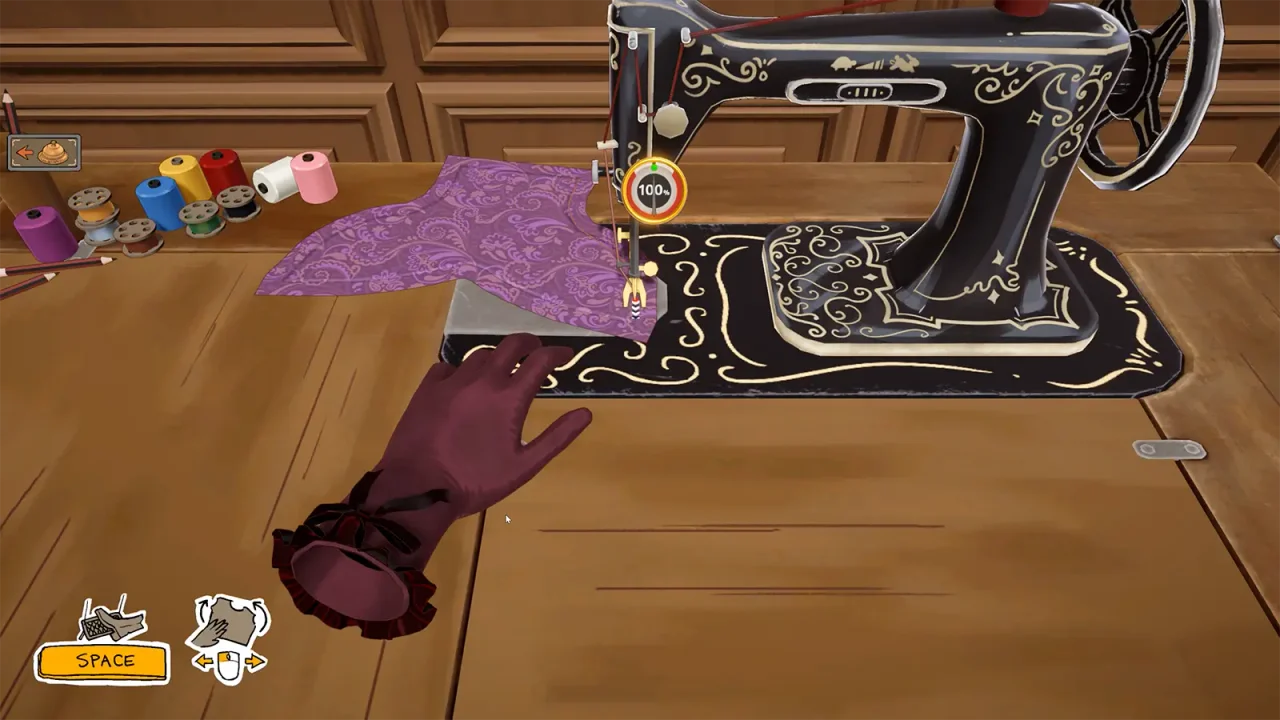
How to change thread colour
This is a thread control, not a fabric recolouring tool. The patch note does not specify a retroactive change to every completed seam, so check the result in your current build rather than relying on that assumption.
- Open the sewing scene with the dress you are working on.
- Click the thread spools to access the colour control.
- Choose the thread colour you want and inspect the seam before continuing.
Section sources: Official documentation
Prepare before the needle moves
Look at the entire seam before starting. A straight run and a tight bend call for different pacing. Leave room to steer the cloth and stop to reposition when you lose the intended path.
The official game description places sewing after arranging and cutting the pattern. That order matters for diagnosis: sewing is only one part of the dress-making process, so a disappointing result is a reason to review the cut panels as well as the seam.
A repeatable practice routine
- Start with a seam whose path you can easily see.
- Move slowly enough to follow the guide without repeated large corrections.
- As a curve approaches, reduce the pace before changing direction.
- Pause and realign instead of trying to rescue a drift at full speed.
- Inspect the result before moving to the next panel.
Quality is not the whole commission
A dress can be neatly assembled yet miss a colour, material or accessory requirement. Keep the client brief visible during your final review. Conversely, a set of green style targets does not prove every seam or panel is complete.
The Steam achievement list includes a challenge for reaching 100% dress quality. Use the achievement tracker if this is your goal, but do not spend every early commission chasing that optional target. Meet the request you are working on first.
When steering becomes uncomfortable
Check the game’s settings for sewing assistance and comfortable controls. Players discuss Sewing Assist in the Steam community, but an assist for stitching is not the same feature as automatic lace placement. Take breaks between long seams and use the setup that keeps the guide readable.
Sewing reads 100%, but the dress quality is still low
A player question describes a finished dress below its target even though the sewing readout looked complete; another describes no improvement after resewing. Those reports do not establish a shared bug or a formula.
Keep a note of the finished-dress score as well as the seam result. The quality troubleshooting guide separates grain, gradient, sewing and achievement symptoms so you can test one change rather than rebuilding everything.
Section sources: Community topic · Community topic
Current reports: sewing machine lag, skipping or jumping
Two Steam topics reviewed October 2 describe sewing-machine movement problems. One player reports that the highest speed feels slower and the machine skips; that player says updating drivers did not remove the symptom. Another reports jumping that makes them slow down and switch speeds, with the resulting mistakes affecting later quality. These are separate player reports, not a confirmed shared cause.
Replies rechecked October 3 show mixed results: one player says a graphics-driver update helped, while the original poster says their drivers are current and the problem remains. Another still reports jumping at slow speed. These accounts do not establish a universal driver fix or a confirmed optimization problem.
The October 1 official status post acknowledges the reporting backlog without naming a sewing-speed repair. Build 410’s published notes also do not list one. Do not present a driver update, a particular speed or restarting a save as a guaranteed solution.
- Record the installed build and the exact sewing speed where the symptom begins.
- Compare the same seam at a lower speed and note whether the skipping or jumping changes; do not treat a temporary improvement as proof of the cause.
- If you already changed a driver or control setting, record whether the symptom changed instead of repeating that step as a universal fix.
- Capture a short clip or screenshot sequence showing the seam, speed and result before reporting the issue.
Section sources: Community topic · Community topic · Official documentation · Official documentation · Community topic
Watch a beginner walkthrough
The YouTube player loads only when you choose Play. YouTube may then use cookies and receive your IP address. This is community footage, not official patch documentation. Use the YouTube link if playback is unavailable.
Sources & further reading
- Dressmaker on Steam ↗
- Into Indie Games — commission walkthrough by Rabiya Rizwan ↗
- Steam — global achievement list ↗
- Steam discussion — placing lace ↗
- Cozy Lives — official announcements, including Build 410 (September 24) ↗
- YouTube — Dressmaker Tips and Tricks for Beginners (community video) ↗
- Steam discussion — How to know why quality is not at 100 (original question excerpt) ↗
- Steam discussion — Is there an indicator for quality failures? (original question excerpt) ↗
- Steam discussion — trouble with sewing (slow/high-speed skipping report) ↗
- Steam discussion — Lag / Jumping sewing machine (speed-switching report) ↗
- Cozy Lives — Everything, Everywhere, All At Once (October 1 status update) ↗
- Cozy Lives — official announcements (Build 410 and October 1 status rechecked October 3) ↗
- Steam discussion — Lag / Jumping sewing machine (mixed driver-update replies rechecked October 3) ↗
Guide reviewed . Community tips are not official repair guarantees. Suggest a correction.