First identify which result is short
Two player questions describe strong sewing results but a lower finished-dress result, including a dress still one point below its target after resewing. These reports identify the problem; they do not establish a shared cause. Do not keep repeating an expensive rebuild without recording what changed.
| What you see | Useful next check | What it does not prove |
|---|---|---|
| A seam reads 100%, but the dress is below its target | Compare the finished result and the cutting decisions for each panel. | That the game has given every part of the dress full quality. |
| A gradient looks right, but the grain indicator disagrees | Compare visual continuity with the indicator before cutting. | That an attractive print arrangement meets the requested quality. |
| The displayed dress quality meets the brief, but delivery fails | Review all other requirements and unfinished pieces. | That quality is the only acceptance condition. |
| The dress displays 100, but a Steam achievement stays locked | Record the dress result, Steam achievement state and build. | That there is a confirmed unlock workaround. |
Section sources: Community topic · Community topic · Community topic
At the cutting table: follow the pattern’s indicator
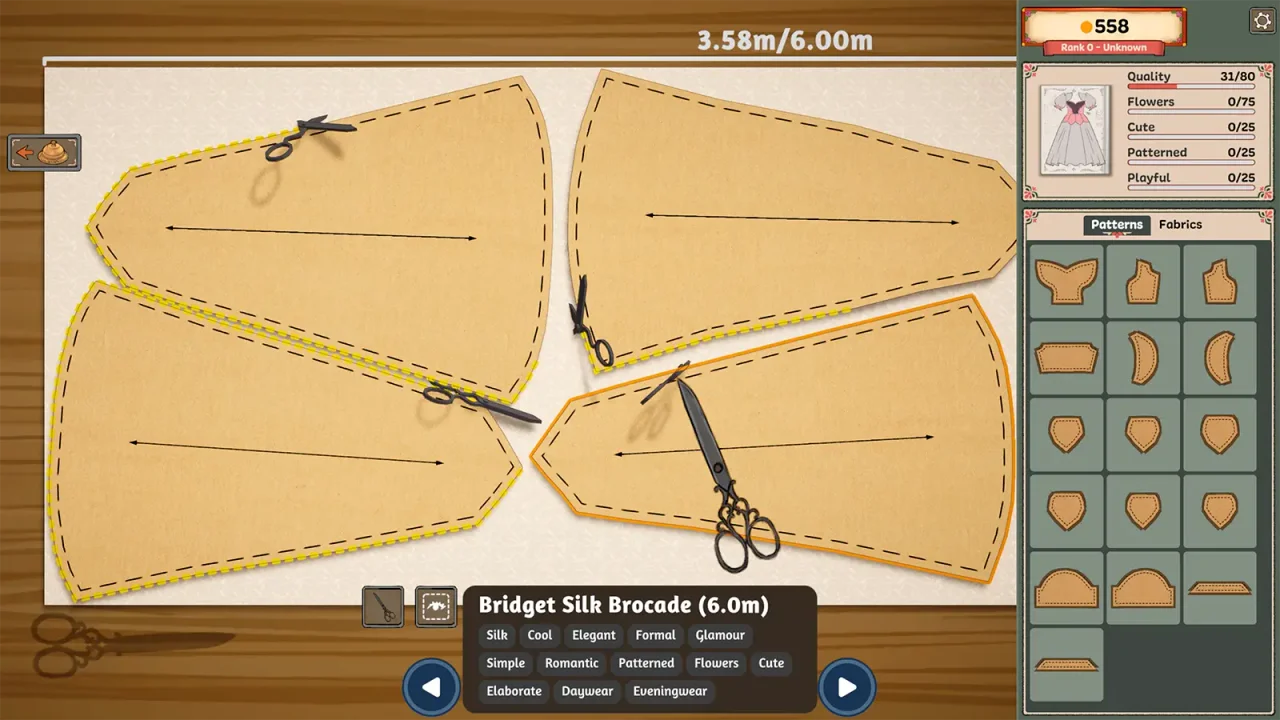
In “Cutting on grain”, players describe using the arrow on each pattern piece and its green indication to improve grain quality. Check the displayed recommendation for the current piece, rather than applying an always-bias or always-straight rule to every pattern.
Inspect the indicator before cutting. Do not infer the finished score from the fabric’s name or from real-world stretch and drape. The cited discussion does not provide the game’s scoring weights.
Section sources: Community topic
Gradient matching and grain quality can pull in different directions
A gradient-skirt discussion reports that aligning the colours across panels can conflict with grain alignment. Another player suggests better seams or improving smaller pieces; the original poster says similar attempts still left some dresses below the target. That disagreement matters: better sewing is not a guaranteed way to offset every off-grain cut.
For a request with a tight quality target, compare a simpler fabric arrangement before buying replacements. Preserve mandatory colours and materials. Changing the visual design is a trade-off, not a documented refund or fixed point bonus.
Section sources: Community topic
A one-change inspection routine
These are investigation steps, not a guaranteed 100% recipe. When the current interface does not show which piece caused the loss, this guide does not invent a hidden diagnostic button.
- Write down the client, exact quality target and current whole-dress result. Keep other requirements beside them.
- For a new cut, check and record each panel’s grain indication before committing the cloth. A quick screenshot can preserve that information.
- For an assembled dress, start with a seam you know needs work instead of recutting every panel at once.
- A community reply suggests using the seam ripper to retry sewing. Check the resulting dress quality after that single change; improvement is not assured.
- Before replacing a panel, inspect available cloth and the cost. Do not assume that undoing work restores spent material.
- Recheck colour, material and style conditions after any change. Stop repeating an attempt that leaves the same result.
Section sources: Community topic · Community topic · Community topic
A displayed 100 and a locked achievement
A separate player reports dresses displaying 100 while the quality achievement remains locked. The readable report does not establish why or provide a confirmed solution. Treat this as a different symptom from failing a client’s minimum quality.
Capture the displayed result and achievement status, including your installed build. Do not assume hidden rounding, a required sale or a special pattern explains the discrepancy. The wiki achievement checklist records your own progress; it does not unlock Steam achievements.
Section sources: Community topic
When the score still does not make sense
Keep the pattern names, fabric choices, known grain readings, seam results and before-and-after dress scores together. Include the exact target and any failed delivery message when reporting the issue to the developers.
This review did not establish a universal quality cap, an exact panel-weight formula or a patch that fixes every shortfall. A community suggestion can guide a careful test without being presented as an official repair.
Measurements can affect quality before cutting starts
The quality discussion now has readable replies from multiple players pointing back to the measuring step: a slightly wrong client measurement can leave the finished dress below its target even when later sewing looks perfect. That is community evidence, not an official scoring specification.
Before spending more fabric, reopen the active client’s measurements and compare them with the mannequin setup you are about to use. If they look wrong or belong to another client, use the dedicated measurement guide instead of compensating with extra sewing or decoration.
One reply gives exact point values for stages. We have not independently confirmed those weights, so this guide does not publish them as a formula or use them to predict a final score.
Section sources: Community topic
Sources & further reading
- Steam discussion — How to know why quality is not at 100 (original question excerpt) ↗
- Steam discussion — Is there an indicator for quality failures? (original question excerpt) ↗
- Steam discussion — Cutting on grain (pattern-arrow replies) ↗
- Steam discussion — Gradient Fabrics and Grain Direction (mixed player results) ↗
- Steam discussion — 100% quality achievement not unlocking (unresolved original report) ↗
- Steam discussion — How to know why quality is not at 100 (measurement and stage-check replies) ↗
Guide reviewed . Community tips are not official repair guarantees. Suggest a correction.